Create a staff card: a discount in % that starts at a spend amount, with an optional monthly limit. Start from a template.
An Employee Card is a discount you issue directly to a member of staff. You set discount levels in % (called steps in the setup). Each level starts at a spend amount. You can add a monthly limit. The discount applies automatically at the POS.
How it works
You issue the card directly to a member of staff.
Each level starts at a spend amount and runs until the next level. For example 100 % from 0 to 300 €, then 20 %.
With a monthly limit, the discount stops at the limit until the reset day. With no limit, the last level applies until the reset day.
On the reset day every employee starts again at the first level.
One employee can have an own limit, different from the card. See A different amount for one employee below.
A monthly staff credit, for example 300 € to spend each month.
A fixed staff discount, for example 20 % for the whole month.
Good to know:
At the limit on Storyous and Papaya tills and in the VEXiON scanner, the bill gets only what is left. Example: 5 € left, bill 20 € at 100 %: 5 € off, the employee pays 15 €. Papaya takes only whole percents, so the discount there can be a little lower, at most 1 % of the bill.
At the limit on Dotykačka and Oberon tills, a bill that starts under the limit is discounted in full, even if it takes the employee over the limit.
A bill that crosses a level still gets the old percentage in full.
The card is issued directly, so there is no signup form and no referral program.
The old Employee credit card is no longer offered. Credit cards you already had are now Employee cards with one 100 % level and the same monthly amount. Each employee keeps what is left this month.
Already created this card? You can edit it any time: change the settings, design, or details, and the update reaches existing cardholders.
Create an employee card
1
Open the card creator
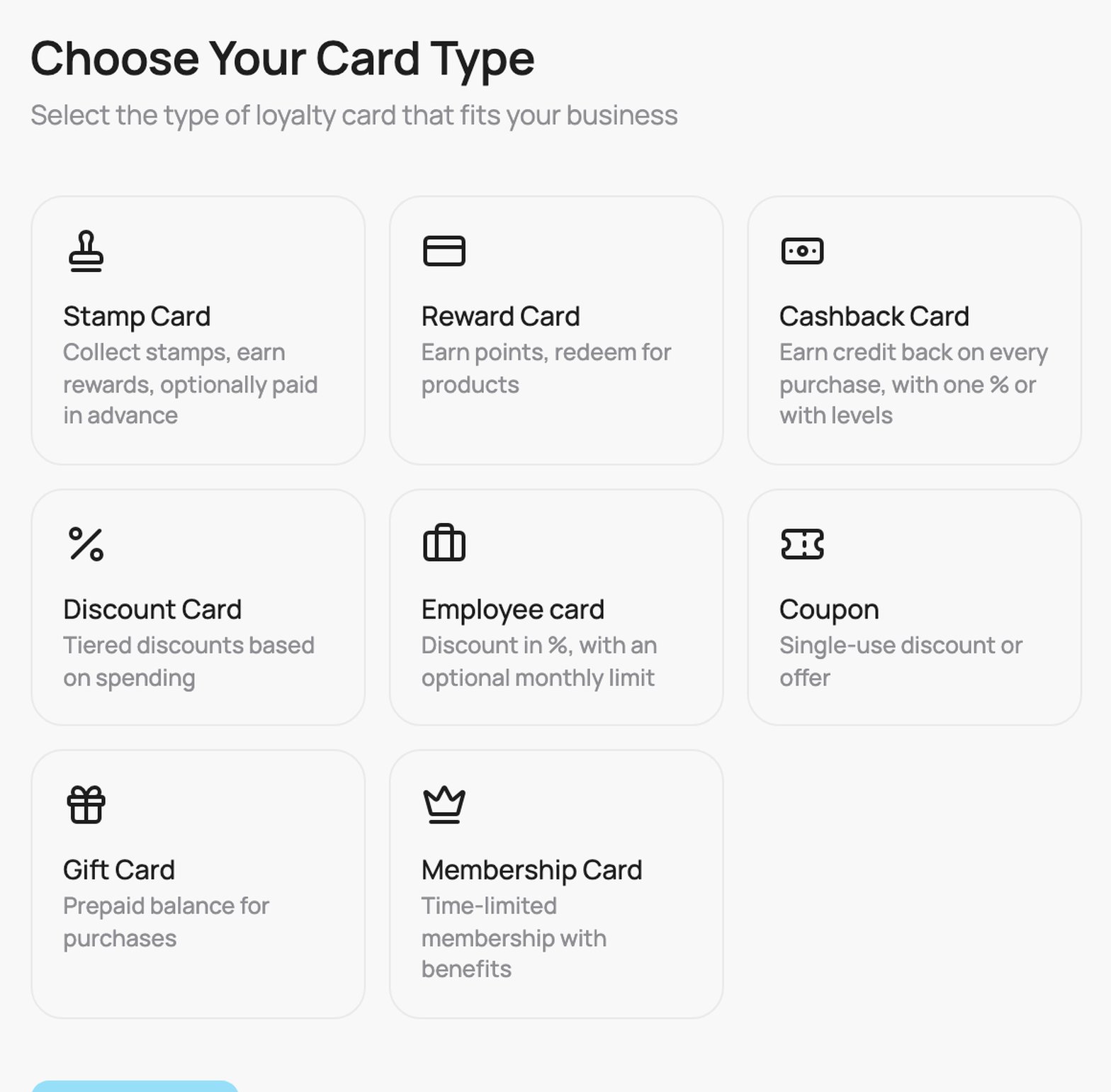
Go to Passes and click Create Card. On Choose Your Card Type, pick Employee card and click Continue.
Choose Your Card Type: the Employee card tile
2
Employee card
On the Employee card step you set three things.Start with a template (new cards only): one click fills the levels and how the month ends. Change anything after.
Discount 20 %: 20 % for the whole month, no limit.
Monthly credit: 100 % up to the monthly limit, 300 by default. Change the amount to what you want to give.
100 %, then 20 %: 100 % from 0 to 300, then 20 % until the reset day.
To go back to your own levels, click Undo in the message that appears, before you change anything else.
The Monthly credit template: 100 % up to a monthly limit of 300 €
Discount during the month: the levels. Each level has a Name on the pass, a From (€) amount and a Discount (%). The first level always starts at 0. A level runs until the next level starts, and the line under each level shows its range. Click Add step for another level. The more the employee spends in the month, the lower the level that applies.
Two levels: 100 % from 0 to 100 €, then 20 %
How the month ends: choose one option.
Stop the discount at a monthly limit: set the Monthly limit (€). From the limit on there is no discount until the reset day. Every level must start below the limit.
No limit: the last level applies until the reset day. With no limit the last level must be below 100 %, otherwise every bill would be free.
Reset every month on day: a day from 1 to 28. On this day every employee starts again at the first level.The How it will work box shows the whole month as one bar: one part per level and the amounts under it. Point at a part of the bar to see its range.
Monthly limit of 150 € and the summary of the month
Advanced settings (closed by default):
What counts toward the steps: Full bill amount (before discount), Net paid (after discount) or Discount value given. With Net paid a 100 % level is not allowed, because nothing is paid and the month would never fill.
Hide budget on pass (switch): when on, the employee sees only the discount on the wallet pass, not the amount left.
A field with a problem turns red. Click Continue.
3
Card Design
On the Card Design step, choose how the card background looks: Auto-generated (an icon pattern, with a Pattern Style and up to 3 icons) or Custom upload (your own background image). Click Continue.
4
Card Appearance
On the Card Appearance step: upload your Logo (480 x 150 px) and Notification Icon (512 x 512 px), and set the Card Colors. Click Continue.
5
Card Information
On the Card Information step, set the text and links on the card:
Company Name: your business name.
Business Links: your website, Instagram and Facebook. They appear on the back of the card.
Review Link: choose Automatic (recommended: the Google review link of the store where each customer signed up), Custom link (one review page you choose, the same for every customer) or Off (no review link on the card). See Review link.
Show terms of use: switch it on to display your terms and conditions on the back of the card, then type them into the box that appears.
Loyalty programme rules: its own switch, separate from Show terms of use. Turn it on and paste the web address of your own programme rules. Customers see the link when they sign up, next to the VEXiON terms, and it does not replace them. The link is never on the card. If you paste an address without https://, it is added for you. See Editing a card.
Click Continue.
6
Review & Create
The Review step summarises everything. Then Save as Draft, or Create & Activate. You then issue the card to the employee.
This month on the customer page
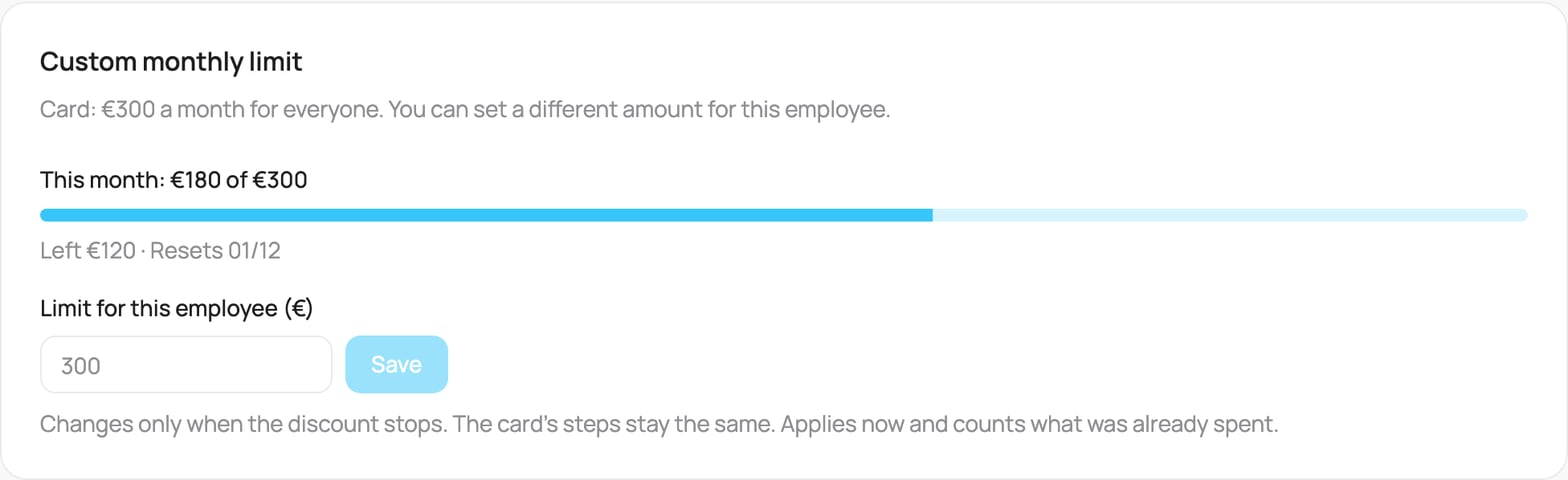
Open the employee in Customers and go to Details. On a card with a monthly limit, the box shows how much the employee used and what is left.
This month on the customer page
This month: 180 € of 300 €: what the employee has used of the limit.
Left 120 € · Resets 1. 12.: what is left and the day the month starts again.
When the limit is used up, the box reads Used up with the reset date.
A different amount for one employee
On a card with a monthly limit, one employee can get a different amount, for example 450 € on a card with 300 €.
Open the employee in Customers and go to Details.
In Custom monthly limit, enter the amount and click Save.
Use the card limit removes it again. The card editor shows under Monthly limit which employees have a custom limit.
Employees with a custom limit in the card editor
Good to know:
A custom limit only changes when the discount stops. The levels of the card stay the same.
If the field turns red, the amount is at or below the start of a level. That level never applies for this employee.
A card with no limit has no custom limits. When you switch a card to No limit, you are asked first, and saving the card removes the custom limits.
Switching to No limit when employees have a custom limit
A different credit for one employee
On a card with No limit, the first level is often a monthly credit, for example 100 % up to 100 €, then 20 % until the reset day. One employee can get a different credit, for example 250 €.
Open the employee in Customers and go to Details.
In Custom monthly credit, enter the amount and click Save.
Use the card credit removes it again.Good to know:
A custom credit only changes where the first level ends. After it, the next level of the card applies.
It applies at once and counts what the employee already spent this month. At 180 € spent, a credit of 250 € gives 70 € more at 100 %.
The POS follows the change. The employee’s card shows the new amount.
A card with a monthly limit has no custom credits; use a custom limit there. When you give a No limit card a monthly limit, saving the card removes the custom credits.
Was this page helpful?
⌘I
{"docsConfig":{"theme":"almond","$schema":"https://mintlify.com/docs.json","name":"VEXiON cards","description":"VEXiON cards public API, integrations, and knowledge base. Build loyalty programs, gift cards, and digital wallet passes for any POS or e-commerce platform.","colors":{"primary":"#36C6FA","light":"#E5F6FF","dark":"#2BA8D9"},"logo":{"light":"https://mintcdn.com/vexioncards/irWPA7dKqFpQDf2M/logo/light.svg?fit=max\u0026auto=format\u0026n=irWPA7dKqFpQDf2M\u0026q=85\u0026s=60356e86b157bf8f5101f425a06a3859","dark":"https://mintcdn.com/vexioncards/irWPA7dKqFpQDf2M/logo/dark.svg?fit=max\u0026auto=format\u0026n=irWPA7dKqFpQDf2M\u0026q=85\u0026s=0410c9131490191d2ec4f30cae98fe11","href":"https://vexioncards.one"},"favicon":"https://mintcdn.com/vexioncards/XA_RCl9_De-pJw5l/favicon.svg?fit=max\u0026auto=format\u0026n=XA_RCl9_De-pJw5l\u0026q=85\u0026s=e44510783108f8292bccb1db803af7c8","api":{"openapi":["openapi.json"],"playground":{"display":"interactive"},"examples":{"languages":["curl","javascript","python"]},"mdx":{"auth":{"method":"bearer","name":"Authorization"},"server":["https://api.vexioncards.one","https://migration.api.vexioncards.one"]}},"appearance":{"default":"light","strict":true},"footer":{"socials":{"github":"https://github.com/VEXiON-cards","linkedin":"https://www.linkedin.com/company/vexioncards","instagram":"https://www.instagram.com/vexioncards"}},"search":{"prompt":"Search docs..."},"seo":{"metatags":{"og:site_name":"VEXiON cards Docs","robots":"noindex, nofollow"},"indexing":"navigable"},"fonts":{"family":"Manrope"},"icons":{"library":"lucide"},"integrations":{"posthog":{"apiKey":"phc_5xDGi1KFzL6dY9SU2niicjR2fwR8SM7uNGZf6SYTgmE","apiHost":"https://eu.i.posthog.com","sessionRecording":true}},"contextual":{"options":["copy","view","chatgpt","claude","perplexity"],"display":"header"},"markdown":{"schema":true},"styling":{"latex":false},"navigation":{"languages":[{"language":"en","default":true,"href":"api-reference/introduction"},{"language":"cs","href":"api-reference/introduction"}]}},"deployment":{"deploymentMetadataValue":{"subdomain":"vexioncards","hasAudioNarration":false,"actualSubdomain":"vexioncards","customDomains":[],"gitSource":{"type":"github","owner":"vexion-cards","repo":"vexion-docs","deployBranch":"main","contentDirectory":"","isPrivate":true,"mountPath":"","label":""},"feedback":{"thumbs":true},"entitlements":{"AI_CHAT":{"status":"DISABLED"}},"buildId":"6af2d2d2e5e36dceb0643bc4","clientVersion":"0.0.4131","searchFilterCounts":[{"language":"cs","tag":"Centrum pomoci","count":104},{"language":"en","tag":"Knowledge Base","count":104},{"language":"default","tag":"API Reference","count":83},{"language":"cs","tag":"Integrácie","count":27},{"language":"en","tag":"Integrations","count":27},{"language":"cs","tag":"POS systémy","count":20},{"language":"en","tag":"POS systems","count":20},{"language":"cs","tag":"Nastavenia","count":18},{"language":"en","tag":"Settings","count":18},{"language":"cs","tag":"Karty","count":17},{"language":"en","tag":"Cards","count":17},{"language":"cs","tag":"Správa existujúcich kariet","count":15},{"language":"en","tag":"Managing Existing Cards","count":15},{"language":"default","tag":"Webhook endpoints","count":10},{"language":"cs","tag":"Skener","count":10},{"language":"en","tag":"Scanner","count":10},{"language":"cs","tag":"Akcie podľa typu karty","count":9},{"language":"en","tag":"Actions by card type","count":9},{"language":"cs","tag":"Typy kariet","count":8},{"language":"cs","tag":"Začíname","count":8},{"language":"en","tag":"Card Types","count":8},{"language":"en","tag":"Getting Started","count":8},{"language":"default","tag":"Cards","count":6},{"language":"default","tag":"Customers","count":6},{"language":"default","tag":"Custom fields","count":5},{"language":"default","tag":"Notifications","count":5},{"language":"default","tag":"Team members","count":5},{"language":"default","tag":"Products","count":4},{"language":"default","tag":"Transactions","count":4},{"language":"default","tag":"MCP server","count":3}]},"assistantConfig":{"enableAskAiButton":false,"enableStarterQuestions":false,"enableContextualStarterQuestions":false,"enableAskAiSearchBar":true,"deflection":{"enabled":false,"type":"email"}},"basePath":"","hasChatPermissions":false,"hasWebMcpPermissions":false,"toggles":[{"name":"kill-isr","enabled":true,"variant":{"name":"disabled","enabled":false,"feature_enabled":true},"impressionData":false},{"name":"custom-rbac-roles","enabled":true,"variant":{"name":"disabled","enabled":false,"feature_enabled":true},"impressionData":false},{"name":"agent-mintlify-slack","enabled":true,"variant":{"name":"disabled","enabled":false,"feature_enabled":true},"impressionData":false},{"name":"agent-integrations-settings","enabled":true,"variant":{"name":"disabled","enabled":false,"feature_enabled":true},"impressionData":false},{"name":"rbac-expansion","enabled":true,"variant":{"name":"disabled","enabled":false,"feature_enabled":true},"impressionData":false},{"name":"automations-pr-grouping","enabled":true,"variant":{"name":"disabled","enabled":false,"feature_enabled":true},"impressionData":false},{"name":"custom-prefix","enabled":true,"variant":{"name":"disabled","enabled":false,"feature_enabled":true},"impressionData":false},{"name":"analytics-v7","enabled":true,"variant":{"name":"disabled","enabled":false,"feature_enabled":true},"impressionData":false},{"name":"user-flows-analytics","enabled":true,"variant":{"name":"disabled","enabled":false,"feature_enabled":true},"impressionData":false},{"name":"no-publish-flow","enabled":true,"variant":{"name":"disabled","enabled":false,"feature_enabled":true},"impressionData":false},{"name":"workos-onboarding","enabled":true,"variant":{"name":"disabled","enabled":false,"feature_enabled":true},"impressionData":false},{"name":"snapshot-serving-live","enabled":true,"variant":{"name":"disabled","enabled":false,"feature_enabled":true},"impressionData":false},{"name":"stripTemperatureMiddleware","enabled":true,"variant":{"name":"disabled","enabled":false,"feature_enabled":true},"impressionData":false},{"name":"support-platform-pylon-zendesk","enabled":true,"variant":{"name":"disabled","enabled":false,"feature_enabled":true},"impressionData":false},{"name":"snapshot-serving","enabled":true,"variant":{"name":"disabled","enabled":false,"feature_enabled":true},"impressionData":false},{"name":"instant-rollback","enabled":true,"variant":{"name":"disabled","enabled":false,"feature_enabled":true},"impressionData":false},{"name":"granular-notifications-server","enabled":true,"variant":{"name":"disabled","enabled":false,"feature_enabled":true},"impressionData":false},{"name":"granular-notifications","enabled":true,"variant":{"name":"disabled","enabled":false,"feature_enabled":true},"impressionData":false},{"name":"automations-fable","enabled":true,"variant":{"name":"disabled","enabled":false,"feature_enabled":true},"impressionData":false},{"name":"fixed-ai-action-pricing","enabled":true,"variant":{"name":"disabled","enabled":false,"feature_enabled":true},"impressionData":false},{"name":"automation-resolve-merge-conflict","enabled":true,"variant":{"name":"disabled","enabled":false,"feature_enabled":true},"impressionData":false},{"name":"scoped-publishing","enabled":true,"variant":{"name":"disabled","enabled":false,"feature_enabled":true},"impressionData":false},{"name":"mintql","enabled":true,"variant":{"name":"disabled","enabled":false,"feature_enabled":true},"impressionData":false},{"name":"page-level-analytics","enabled":true,"variant":{"name":"disabled","enabled":false,"feature_enabled":true},"impressionData":false},{"name":"editor-version-history-v2","enabled":true,"variant":{"name":"disabled","enabled":false,"feature_enabled":true},"impressionData":false},{"name":"billing-page-v2","enabled":true,"variant":{"name":"disabled","enabled":false,"feature_enabled":true},"impressionData":false},{"name":"full-page-search","enabled":true,"variant":{"name":"disabled","enabled":false,"feature_enabled":true},"impressionData":false},{"name":"workspace-projects","enabled":true,"variant":{"name":"disabled","enabled":false,"feature_enabled":true},"impressionData":false},{"name":"assistant-v5","enabled":true,"variant":{"name":"disabled","enabled":false,"feature_enabled":true},"impressionData":false},{"name":"fork-pr-previews","enabled":true,"variant":{"name":"disabled","enabled":false,"feature_enabled":true},"impressionData":false},{"name":"revalidation-jwt","enabled":true,"variant":{"name":"disabled","enabled":false,"feature_enabled":true},"impressionData":false},{"name":"workos-sso-scim","enabled":true,"variant":{"name":"disabled","enabled":false,"feature_enabled":true},"impressionData":false},{"name":"hobby-abuse-scan","enabled":true,"variant":{"name":"disabled","enabled":false,"feature_enabled":true},"impressionData":false},{"name":"dashboard-inbox","enabled":true,"variant":{"name":"disabled","enabled":false,"feature_enabled":true},"impressionData":false},{"name":"workos-signup","enabled":true,"variant":{"name":"disabled","enabled":false,"feature_enabled":true},"impressionData":false},{"name":"turbopuffer-dual-write","enabled":true,"variant":{"name":"disabled","enabled":false,"feature_enabled":true},"impressionData":false},{"name":"workos-enabled","enabled":true,"variant":{"name":"disabled","enabled":false,"feature_enabled":true},"impressionData":false},{"name":"approve-review-flow","enabled":true,"variant":{"name":"disabled","enabled":false,"feature_enabled":true},"impressionData":false},{"name":"editor-metadata","enabled":true,"variant":{"name":"disabled","enabled":false,"feature_enabled":true},"impressionData":false},{"name":"sso-setup-deadline-banner","enabled":true,"variant":{"name":"disabled","enabled":false,"feature_enabled":true},"impressionData":false},{"name":"turbopuffer-serve","enabled":true,"variant":{"name":"disabled","enabled":false,"feature_enabled":true},"impressionData":false},{"name":"live-agents","enabled":true,"variant":{"name":"disabled","enabled":false,"feature_enabled":true},"impressionData":false},{"name":"llms-txt-v2","enabled":true,"variant":{"name":"disabled","enabled":false,"feature_enabled":true},"impressionData":false}],"googleFontsInlined":true},"customCss":[],"page":{"pagePath":"knowledge-base/employee-card","slug":"/knowledge-base/employee-card","pageMetadata":{"title":"Employee Card","description":"Create a staff card: a discount in % that starts at a spend amount, with an optional monthly limit. Start from a template.","href":"/knowledge-base/employee-card"},"description":{"compiledSource":"\"use strict\";\nconst {jsx: _jsx} = arguments[0];\nconst {useMDXComponents: _provideComponents} = arguments[0];\nfunction _createMdxContent(props) {\n const _components = {\n p: \"p\",\n ..._provideComponents(),\n ...props.components\n };\n return _jsx(_components.p, {\n children: \"Create a staff card: a discount in % that starts at a spend amount, with an optional monthly limit. Start from a template.\"\n });\n}\nfunction MDXContent(props = {}) {\n const {wrapper: MDXLayout} = {\n ..._provideComponents(),\n ...props.components\n };\n return MDXLayout ? _jsx(MDXLayout, {\n ...props,\n children: _jsx(_createMdxContent, {\n ...props\n })\n }) : _createMdxContent(props);\n}\nreturn {\n default: MDXContent\n};\n","frontmatter":{},"scope":{}},"pageType":"default","mdx":{"mdxSource":{"compiledSource":"\"use strict\";const{Fragment:_Fragment,jsx:_jsx,jsxs:_jsxs}=arguments[0];const{useMDXComponents:_provideComponents}=arguments[0];function _createMdxContent(props){const _components={a:`a`,code:`code`,li:`li`,ol:`ol`,p:`p`,strong:`strong`,ul:`ul`,..._provideComponents(),...props.components},{Frame,Heading,Info,OptimizedImage,Step,Steps,Tip}=_components;if(!Frame)_missingMdxReference(`Frame`,true);if(!Heading)_missingMdxReference(`Heading`,true);if(!Info)_missingMdxReference(`Info`,true);if(!OptimizedImage)_missingMdxReference(`OptimizedImage`,true);if(!Step)_missingMdxReference(`Step`,true);if(!Steps)_missingMdxReference(`Steps`,true);if(!Tip)_missingMdxReference(`Tip`,true);return _jsxs(_Fragment,{children:[_jsxs(_components.p,{children:[`An `,_jsx(_components.strong,{children:`Employee Card`}),` is a discount you issue directly to a member of staff. You set discount `,_jsx(_components.strong,{children:`levels`}),` in % (called steps in the setup). Each level starts at a spend amount. You can add a `,_jsx(_components.strong,{children:`monthly limit`}),`. The discount applies automatically at the POS.`]}),`\n`,_jsx(Heading,{level:`2`,id:`how-it-works`,children:`How it works`}),`\n`,_jsxs(_components.ul,{children:[`\n`,_jsx(_components.li,{children:`You issue the card directly to a member of staff.`}),`\n`,_jsx(_components.li,{children:`Each level starts at a spend amount and runs until the next level. For example 100 % from 0 to 300 €, then 20 %.`}),`\n`,_jsx(_components.li,{children:`With a monthly limit, the discount stops at the limit until the reset day. With no limit, the last level applies until the reset day.`}),`\n`,_jsx(_components.li,{children:`On the reset day every employee starts again at the first level.`}),`\n`,_jsxs(_components.li,{children:[`One employee can have an `,_jsx(_components.strong,{children:`own limit`}),`, different from the card. See `,_jsx(_components.strong,{children:`A different amount for one employee`}),` below.`]}),`\n`,_jsxs(_components.li,{children:[`On the customer page, the employee sees what is spent and what is left this month. See `,_jsx(_components.a,{href:`#this-month-on-the-customer-page`,children:`This month on the customer page`}),`.`]}),`\n`]}),`\n`,_jsx(Heading,{level:`2`,id:`best-for`,children:`Best for`}),`\n`,_jsxs(_components.ul,{children:[`\n`,_jsx(_components.li,{children:`Staff perks that you want to keep under control.`}),`\n`,_jsx(_components.li,{children:`A monthly staff credit, for example 300 € to spend each month.`}),`\n`,_jsx(_components.li,{children:`A fixed staff discount, for example 20 % for the whole month.`}),`\n`]}),`\n`,_jsxs(Info,{children:[_jsx(_components.p,{children:_jsx(_components.strong,{children:`Good to know:`})}),_jsxs(_components.ul,{children:[`\n`,_jsxs(_components.li,{children:[`At the limit on `,_jsx(_components.strong,{children:`Storyous`}),` and `,_jsx(_components.strong,{children:`Papaya`}),` tills and in the VEXiON scanner, the bill gets only what is left. Example: 5 € left, bill 20 € at 100 %: 5 € off, the employee pays 15 €. Papaya takes only whole percents, so the discount there can be a little lower, at most 1 % of the bill.`]}),`\n`,_jsxs(_components.li,{children:[`At the limit on `,_jsx(_components.strong,{children:`Dotykačka`}),` and `,_jsx(_components.strong,{children:`Oberon`}),` tills, a bill that starts under the limit is discounted in full, even if it takes the employee over the limit.`]}),`\n`,_jsx(_components.li,{children:`A bill that crosses a level still gets the old percentage in full.`}),`\n`,_jsxs(_components.li,{children:[`The card is issued directly, so there is `,_jsx(_components.strong,{children:`no signup form`}),` and no referral program.`]}),`\n`,_jsxs(_components.li,{children:[`The old `,_jsx(_components.strong,{children:`Employee credit card`}),` is no longer offered. Credit cards you already had are now Employee cards with one 100 % level and the same monthly amount. Each employee keeps what is left this month.`]}),`\n`]})]}),`\n`,_jsx(Tip,{children:_jsxs(_components.p,{children:[`Already created this card? You can `,_jsx(_components.a,{href:`/knowledge-base/editing-a-card`,children:`edit it any time`}),`: change the settings, design, or details, and the update reaches existing cardholders.`]})}),`\n`,_jsx(Heading,{level:`2`,id:`create-an-employee-card`,children:`Create an employee card`}),`\n`,_jsxs(Steps,{children:[_jsxs(Step,{title:`Open the card creator`,children:[_jsxs(_components.p,{children:[`Go to `,_jsx(_components.strong,{children:`Passes`}),` and click `,_jsx(_components.strong,{children:`Create Card`}),`. On `,_jsx(_components.strong,{children:`Choose Your Card Type`}),`, pick `,_jsx(_components.strong,{children:`Employee card`}),` and click `,_jsx(_components.strong,{children:`Continue`}),`.`]}),_jsx(Frame,{caption:`Choose Your Card Type: the Employee card tile`,children:_jsx(OptimizedImage,{src:`https://mintcdn.com/vexioncards/voso4A4v7D7u28Sw/images/card-types-picker.png?fit=max\u0026auto=format\u0026n=voso4A4v7D7u28Sw\u0026q=85\u0026s=a8ddf4f7731fc64f1e3a93a20b89dbd3`,alt:`The Choose Your Card Type screen with eight tiles. Employee card reads Discount in %, with an optional monthly limit.`,\"data-og-width\":`1568`,width:`1568`,\"data-og-height\":`1541`,height:`1541`,\"data-path\":`images/card-types-picker.png`,\"data-optimize\":`true`,\"data-opv\":`3`,srcset:`https://mintcdn.com/vexioncards/voso4A4v7D7u28Sw/images/card-types-picker.png?w=280\u0026fit=max\u0026auto=format\u0026n=voso4A4v7D7u28Sw\u0026q=85\u0026s=a3f9c348932d128a429d6c5a2982ccdd 280w, https://mintcdn.com/vexioncards/voso4A4v7D7u28Sw/images/card-types-picker.png?w=560\u0026fit=max\u0026auto=format\u0026n=voso4A4v7D7u28Sw\u0026q=85\u0026s=a6afdea07d1155db4d56c6ee9e162581 560w, https://mintcdn.com/vexioncards/voso4A4v7D7u28Sw/images/card-types-picker.png?w=840\u0026fit=max\u0026auto=format\u0026n=voso4A4v7D7u28Sw\u0026q=85\u0026s=1931985bffec4183ad9030081fe37c81 840w, https://mintcdn.com/vexioncards/voso4A4v7D7u28Sw/images/card-types-picker.png?w=1100\u0026fit=max\u0026auto=format\u0026n=voso4A4v7D7u28Sw\u0026q=85\u0026s=10ad5eea6b1e55f4c36843de7f0fcf84 1100w, https://mintcdn.com/vexioncards/voso4A4v7D7u28Sw/images/card-types-picker.png?w=1650\u0026fit=max\u0026auto=format\u0026n=voso4A4v7D7u28Sw\u0026q=85\u0026s=3d286a8ef8ec5cd1790f4cbf50f3b49c 1650w, https://mintcdn.com/vexioncards/voso4A4v7D7u28Sw/images/card-types-picker.png?w=2500\u0026fit=max\u0026auto=format\u0026n=voso4A4v7D7u28Sw\u0026q=85\u0026s=0093e1e897314b9c9dd63bdc5ed35cde 2500w`})})]}),_jsxs(Step,{title:`Employee card`,children:[_jsxs(_components.p,{children:[`On the `,_jsx(_components.strong,{children:`Employee card`}),` step you set three things.`]}),_jsxs(_components.p,{children:[_jsx(_components.strong,{children:`Start with a template`}),` (new cards only): one click fills the levels and how the month ends. Change anything after.`]}),_jsxs(_components.ul,{children:[`\n`,_jsxs(_components.li,{children:[_jsx(_components.strong,{children:`Discount 20 %`}),`: 20 % for the whole month, no limit.`]}),`\n`,_jsxs(_components.li,{children:[_jsx(_components.strong,{children:`Monthly credit`}),`: 100 % up to the monthly limit, 300 by default. Change the amount to what you want to give.`]}),`\n`,_jsxs(_components.li,{children:[_jsx(_components.strong,{children:`100 %, then 20 %`}),`: 100 % from 0 to 300, then 20 % until the reset day.`]}),`\n`]}),_jsxs(_components.p,{children:[`To go back to your own levels, click `,_jsx(_components.strong,{children:`Undo`}),` in the message that appears, before you change anything else.`]}),_jsx(Frame,{caption:`The Monthly credit template: 100 % up to a monthly limit of 300 €`,children:_jsx(OptimizedImage,{src:`https://mintcdn.com/vexioncards/RasLrEnfnjCO5Q4M/images/employee-card-setup.png?fit=max\u0026auto=format\u0026n=RasLrEnfnjCO5Q4M\u0026q=85\u0026s=9ddb8a3e31807e1efb23a49198498a20`,alt:`The Employee card step with the template Monthly credit selected: one level Credit at 100 % from 0, Stop the discount at a monthly limit selected, Monthly limit 300, reset on day 1.`,\"data-og-width\":`1568`,width:`1568`,\"data-og-height\":`2395`,height:`2395`,\"data-path\":`images/employee-card-setup.png`,\"data-optimize\":`true`,\"data-opv\":`3`,srcset:`https://mintcdn.com/vexioncards/RasLrEnfnjCO5Q4M/images/employee-card-setup.png?w=280\u0026fit=max\u0026auto=format\u0026n=RasLrEnfnjCO5Q4M\u0026q=85\u0026s=d817ed364f38a46d63f1e5f2d00aa89b 280w, https://mintcdn.com/vexioncards/RasLrEnfnjCO5Q4M/images/employee-card-setup.png?w=560\u0026fit=max\u0026auto=format\u0026n=RasLrEnfnjCO5Q4M\u0026q=85\u0026s=740ab932efd7f9adaae04e5b60a8a15e 560w, https://mintcdn.com/vexioncards/RasLrEnfnjCO5Q4M/images/employee-card-setup.png?w=840\u0026fit=max\u0026auto=format\u0026n=RasLrEnfnjCO5Q4M\u0026q=85\u0026s=22ef733863e9a3670166157cd356e8a0 840w, https://mintcdn.com/vexioncards/RasLrEnfnjCO5Q4M/images/employee-card-setup.png?w=1100\u0026fit=max\u0026auto=format\u0026n=RasLrEnfnjCO5Q4M\u0026q=85\u0026s=6a03f300724372c2752d00ab75521720 1100w, https://mintcdn.com/vexioncards/RasLrEnfnjCO5Q4M/images/employee-card-setup.png?w=1650\u0026fit=max\u0026auto=format\u0026n=RasLrEnfnjCO5Q4M\u0026q=85\u0026s=88cd9c0dbfb2965592ae6c1a511537e5 1650w, https://mintcdn.com/vexioncards/RasLrEnfnjCO5Q4M/images/employee-card-setup.png?w=2500\u0026fit=max\u0026auto=format\u0026n=RasLrEnfnjCO5Q4M\u0026q=85\u0026s=96edc83bf55aafa9df4ef75187e0cf4c 2500w`})}),_jsxs(_components.p,{children:[_jsx(_components.strong,{children:`Discount during the month`}),`: the levels. Each level has a `,_jsx(_components.strong,{children:`Name on the pass`}),`, a `,_jsx(_components.strong,{children:`From (€)`}),` amount and a `,_jsx(_components.strong,{children:`Discount (%)`}),`. The first level always starts at 0. A level runs until the next level starts, and the line under each level shows its range. Click `,_jsx(_components.strong,{children:`Add step`}),` for another level. The more the employee spends in the month, the lower the level that applies.`]}),_jsx(Frame,{caption:`Two levels: 100 % from 0 to 100 €, then 20 %`,children:_jsx(OptimizedImage,{src:`https://mintcdn.com/vexioncards/xpkXKQ_5xTKL6e-C/images/employee-discount-steps.png?fit=max\u0026auto=format\u0026n=xpkXKQ_5xTKL6e-C\u0026q=85\u0026s=d5b51ee94cfa2dbb5e48efdcab04418f`,alt:`Discount during the month with two steps: Full discount at 100 % from 0 €, Reduced at 20 % from 100 €, and the Add step button.`,\"data-og-width\":`1568`,width:`1568`,\"data-og-height\":`1090`,height:`1090`,\"data-path\":`images/employee-discount-steps.png`,\"data-optimize\":`true`,\"data-opv\":`3`,srcset:`https://mintcdn.com/vexioncards/xpkXKQ_5xTKL6e-C/images/employee-discount-steps.png?w=280\u0026fit=max\u0026auto=format\u0026n=xpkXKQ_5xTKL6e-C\u0026q=85\u0026s=122fc2a52c985325efc7822f5a76b6f1 280w, https://mintcdn.com/vexioncards/xpkXKQ_5xTKL6e-C/images/employee-discount-steps.png?w=560\u0026fit=max\u0026auto=format\u0026n=xpkXKQ_5xTKL6e-C\u0026q=85\u0026s=5df0d5ffdc74fcab3cd296babbb01c6d 560w, https://mintcdn.com/vexioncards/xpkXKQ_5xTKL6e-C/images/employee-discount-steps.png?w=840\u0026fit=max\u0026auto=format\u0026n=xpkXKQ_5xTKL6e-C\u0026q=85\u0026s=81766e3759e6aef7612e8eae5cf9e1d7 840w, https://mintcdn.com/vexioncards/xpkXKQ_5xTKL6e-C/images/employee-discount-steps.png?w=1100\u0026fit=max\u0026auto=format\u0026n=xpkXKQ_5xTKL6e-C\u0026q=85\u0026s=e1ad423a669ed5576f5e68cb82e4f64a 1100w, https://mintcdn.com/vexioncards/xpkXKQ_5xTKL6e-C/images/employee-discount-steps.png?w=1650\u0026fit=max\u0026auto=format\u0026n=xpkXKQ_5xTKL6e-C\u0026q=85\u0026s=d52676958435e5f0b35c8829de7ee622 1650w, https://mintcdn.com/vexioncards/xpkXKQ_5xTKL6e-C/images/employee-discount-steps.png?w=2500\u0026fit=max\u0026auto=format\u0026n=xpkXKQ_5xTKL6e-C\u0026q=85\u0026s=663ebeb374364a241f19e2cae118990e 2500w`})}),_jsxs(_components.p,{children:[_jsx(_components.strong,{children:`How the month ends`}),`: choose one option.`]}),_jsxs(_components.ul,{children:[`\n`,_jsxs(_components.li,{children:[_jsx(_components.strong,{children:`Stop the discount at a monthly limit`}),`: set the `,_jsx(_components.strong,{children:`Monthly limit (€)`}),`. From the limit on there is no discount until the reset day. Every level must start below the limit.`]}),`\n`,_jsxs(_components.li,{children:[_jsx(_components.strong,{children:`No limit`}),`: the last level applies until the reset day. With no limit the last level must be below 100 %, otherwise every bill would be free.`]}),`\n`]}),_jsxs(_components.p,{children:[_jsx(_components.strong,{children:`Reset every month on day`}),`: a day from 1 to 28. On this day every employee starts again at the first level.`]}),_jsxs(_components.p,{children:[`The `,_jsx(_components.strong,{children:`How it will work`}),` box shows the whole month as one bar: one part per level and the amounts under it. Point at a part of the bar to see its range.`]}),_jsx(Frame,{caption:`Monthly limit of 150 € and the summary of the month`,children:_jsx(OptimizedImage,{src:`https://mintcdn.com/vexioncards/xpkXKQ_5xTKL6e-C/images/employee-discount-month-end.png?fit=max\u0026auto=format\u0026n=xpkXKQ_5xTKL6e-C\u0026q=85\u0026s=2635b6c316651cdcd8903622e83b48a7`,alt:`How the month ends with Stop the discount at a monthly limit selected, Monthly limit 150 €, reset on day 1, and How it will work as one bar: 100 % from 0 to 100 €, 20 % from 100 to 150 €, 0 % from 150 € until the reset day.`,\"data-og-width\":`1568`,width:`1568`,\"data-og-height\":`1435`,height:`1435`,\"data-path\":`images/employee-discount-month-end.png`,\"data-optimize\":`true`,\"data-opv\":`3`,srcset:`https://mintcdn.com/vexioncards/xpkXKQ_5xTKL6e-C/images/employee-discount-month-end.png?w=280\u0026fit=max\u0026auto=format\u0026n=xpkXKQ_5xTKL6e-C\u0026q=85\u0026s=6bfe12b1be4f3809ee9f990a5702dd06 280w, https://mintcdn.com/vexioncards/xpkXKQ_5xTKL6e-C/images/employee-discount-month-end.png?w=560\u0026fit=max\u0026auto=format\u0026n=xpkXKQ_5xTKL6e-C\u0026q=85\u0026s=a05ab35c6d0b7c24a1714a94c69cb207 560w, https://mintcdn.com/vexioncards/xpkXKQ_5xTKL6e-C/images/employee-discount-month-end.png?w=840\u0026fit=max\u0026auto=format\u0026n=xpkXKQ_5xTKL6e-C\u0026q=85\u0026s=bca11e3f0ad72b2aa66a924ec398eea3 840w, https://mintcdn.com/vexioncards/xpkXKQ_5xTKL6e-C/images/employee-discount-month-end.png?w=1100\u0026fit=max\u0026auto=format\u0026n=xpkXKQ_5xTKL6e-C\u0026q=85\u0026s=027bf827b076b3f70e93da21ba9e3d42 1100w, https://mintcdn.com/vexioncards/xpkXKQ_5xTKL6e-C/images/employee-discount-month-end.png?w=1650\u0026fit=max\u0026auto=format\u0026n=xpkXKQ_5xTKL6e-C\u0026q=85\u0026s=784206a1bc1599feeba0b6644de3a2ff 1650w, https://mintcdn.com/vexioncards/xpkXKQ_5xTKL6e-C/images/employee-discount-month-end.png?w=2500\u0026fit=max\u0026auto=format\u0026n=xpkXKQ_5xTKL6e-C\u0026q=85\u0026s=9b3b836a1b9e5b745f5d202fb7fa2eff 2500w`})}),_jsxs(_components.p,{children:[_jsx(_components.strong,{children:`Advanced settings`}),` (closed by default):`]}),_jsxs(_components.ul,{children:[`\n`,_jsxs(_components.li,{children:[_jsx(_components.strong,{children:`What counts toward the steps`}),`: `,_jsx(_components.strong,{children:`Full bill amount (before discount)`}),`, `,_jsx(_components.strong,{children:`Net paid (after discount)`}),` or `,_jsx(_components.strong,{children:`Discount value given`}),`. With `,_jsx(_components.strong,{children:`Net paid`}),` a 100 % level is not allowed, because nothing is paid and the month would never fill.`]}),`\n`,_jsxs(_components.li,{children:[_jsx(_components.strong,{children:`Hide budget on pass`}),` (switch): when on, the employee sees only the discount on the wallet pass, not the amount left.`]}),`\n`]}),_jsxs(_components.p,{children:[`A field with a problem turns red. Click `,_jsx(_components.strong,{children:`Continue`}),`.`]})]}),_jsx(Step,{title:`Card Design`,children:_jsxs(_components.p,{children:[`On the `,_jsx(_components.strong,{children:`Card Design`}),` step, choose how the card background looks: `,_jsx(_components.strong,{children:`Auto-generated`}),` (an icon pattern, with a Pattern Style and up to 3 icons) or `,_jsx(_components.strong,{children:`Custom upload`}),` (your own background image). Click `,_jsx(_components.strong,{children:`Continue`}),`.`]})}),_jsx(Step,{title:`Card Appearance`,children:_jsxs(_components.p,{children:[`On the `,_jsx(_components.strong,{children:`Card Appearance`}),` step: upload your `,_jsx(_components.strong,{children:`Logo`}),` (480 x 150 px) and `,_jsx(_components.strong,{children:`Notification Icon`}),` (512 x 512 px), and set the `,_jsx(_components.strong,{children:`Card Colors`}),`. Click `,_jsx(_components.strong,{children:`Continue`}),`.`]})}),_jsxs(Step,{title:`Card Information`,children:[_jsxs(_components.p,{children:[`On the `,_jsx(_components.strong,{children:`Card Information`}),` step, set the text and links on the card:`]}),_jsxs(_components.ul,{children:[`\n`,_jsxs(_components.li,{children:[_jsx(_components.strong,{children:`Company Name`}),`: your business name.`]}),`\n`,_jsxs(_components.li,{children:[_jsx(_components.strong,{children:`Business Links`}),`: your website, Instagram and Facebook. They appear on the back of the card.`]}),`\n`,_jsxs(_components.li,{children:[_jsx(_components.strong,{children:`Review Link`}),`: choose `,_jsx(_components.strong,{children:`Automatic`}),` (recommended: the Google review link of the store where each customer signed up), `,_jsx(_components.strong,{children:`Custom link`}),` (one review page you choose, the same for every customer) or `,_jsx(_components.strong,{children:`Off`}),` (no review link on the card). See `,_jsx(_components.a,{href:`/knowledge-base/google-review`,children:`Review link`}),`.`]}),`\n`,_jsxs(_components.li,{children:[_jsx(_components.strong,{children:`Show terms of use`}),`: switch it on to display your terms and conditions on the back of the card, then type them into the box that appears.`]}),`\n`,_jsxs(_components.li,{children:[_jsx(_components.strong,{children:`Loyalty programme rules`}),`: its own switch, separate from `,_jsx(_components.strong,{children:`Show terms of use`}),`. Turn it on and paste the web address of your own programme rules. Customers see the link when they sign up, next to the VEXiON terms, and it does not replace them. The link is never on the card. If you paste an address without `,_jsx(_components.code,{children:`https://`}),`, it is added for you. See `,_jsx(_components.a,{href:`/knowledge-base/editing-a-card`,children:`Editing a card`}),`.`]}),`\n`]}),_jsxs(_components.p,{children:[`Click `,_jsx(_components.strong,{children:`Continue`}),`.`]})]}),_jsx(Step,{title:`Review \u0026 Create`,children:_jsxs(_components.p,{children:[`The `,_jsx(_components.strong,{children:`Review`}),` step summarises everything. Then `,_jsx(_components.strong,{children:`Save as Draft`}),`, or `,_jsx(_components.strong,{children:`Create \u0026 Activate`}),`. You then issue the card to the employee.`]})})]}),`\n`,_jsx(Heading,{level:`2`,id:`this-month-on-the-customer-page`,children:`This month on the customer page`}),`\n`,_jsxs(_components.p,{children:[`Open the employee in `,_jsx(_components.strong,{children:`Customers`}),` and go to `,_jsx(_components.strong,{children:`Details`}),`. On a card with a monthly limit, the box shows how much the employee used and what is left.`]}),`\n`,_jsx(Frame,{caption:`This month on the customer page`,children:_jsx(OptimizedImage,{src:`https://mintcdn.com/vexioncards/RasLrEnfnjCO5Q4M/images/employee-card-this-month.png?fit=max\u0026auto=format\u0026n=RasLrEnfnjCO5Q4M\u0026q=85\u0026s=9f7cf054a301dcf18c44a3d8603cbd62`,alt:`The employee box with the line This month: 180 of 300, a progress bar, the line Left 120 and the reset date, and the field Limit for this employee.`,\"data-og-width\":`1568`,width:`1568`,\"data-og-height\":`480`,height:`480`,\"data-path\":`images/employee-card-this-month.png`,\"data-optimize\":`true`,\"data-opv\":`3`,srcset:`https://mintcdn.com/vexioncards/RasLrEnfnjCO5Q4M/images/employee-card-this-month.png?w=280\u0026fit=max\u0026auto=format\u0026n=RasLrEnfnjCO5Q4M\u0026q=85\u0026s=cdc8b4afb58bc7664d8063055465b638 280w, https://mintcdn.com/vexioncards/RasLrEnfnjCO5Q4M/images/employee-card-this-month.png?w=560\u0026fit=max\u0026auto=format\u0026n=RasLrEnfnjCO5Q4M\u0026q=85\u0026s=5fff973b56380069a66cb7d45a814dcf 560w, https://mintcdn.com/vexioncards/RasLrEnfnjCO5Q4M/images/employee-card-this-month.png?w=840\u0026fit=max\u0026auto=format\u0026n=RasLrEnfnjCO5Q4M\u0026q=85\u0026s=dcdc43552784733100ca85664cb518e8 840w, https://mintcdn.com/vexioncards/RasLrEnfnjCO5Q4M/images/employee-card-this-month.png?w=1100\u0026fit=max\u0026auto=format\u0026n=RasLrEnfnjCO5Q4M\u0026q=85\u0026s=729295750b074f82b0309a2435e460bb 1100w, https://mintcdn.com/vexioncards/RasLrEnfnjCO5Q4M/images/employee-card-this-month.png?w=1650\u0026fit=max\u0026auto=format\u0026n=RasLrEnfnjCO5Q4M\u0026q=85\u0026s=ac508d7087f21ae27385a8536f59c4d7 1650w, https://mintcdn.com/vexioncards/RasLrEnfnjCO5Q4M/images/employee-card-this-month.png?w=2500\u0026fit=max\u0026auto=format\u0026n=RasLrEnfnjCO5Q4M\u0026q=85\u0026s=8222a70253ba3e8fc6039054e77a22e6 2500w`})}),`\n`,_jsxs(_components.ul,{children:[`\n`,_jsxs(_components.li,{children:[_jsx(_components.strong,{children:`This month: 180 € of 300 €`}),`: what the employee has used of the limit.`]}),`\n`,_jsxs(_components.li,{children:[_jsx(_components.strong,{children:`Left 120 € · Resets 1. 12.`}),`: what is left and the day the month starts again.`]}),`\n`,_jsxs(_components.li,{children:[`When the limit is used up, the box reads `,_jsx(_components.strong,{children:`Used up`}),` with the reset date.`]}),`\n`]}),`\n`,_jsx(Heading,{level:`2`,id:`a-different-amount-for-one-employee`,children:`A different amount for one employee`}),`\n`,_jsx(_components.p,{children:`On a card with a monthly limit, one employee can get a different amount, for example 450 € on a card with 300 €.`}),`\n`,_jsxs(_components.ol,{children:[`\n`,_jsxs(_components.li,{children:[`Open the employee in `,_jsx(_components.strong,{children:`Customers`}),` and go to `,_jsx(_components.strong,{children:`Details`}),`.`]}),`\n`,_jsxs(_components.li,{children:[`In `,_jsx(_components.strong,{children:`Custom monthly limit`}),`, enter the amount and click `,_jsx(_components.strong,{children:`Save`}),`.`]}),`\n`]}),`\n`,_jsxs(_components.p,{children:[_jsx(_components.strong,{children:`Use the card limit`}),` removes it again. The card editor shows under `,_jsx(_components.strong,{children:`Monthly limit`}),` which employees have a custom limit.`]}),`\n`,_jsx(Frame,{caption:`Employees with a custom limit in the card editor`,children:_jsx(OptimizedImage,{src:`https://mintcdn.com/vexioncards/RasLrEnfnjCO5Q4M/images/employee-discount-own-limits-editor.png?fit=max\u0026auto=format\u0026n=RasLrEnfnjCO5Q4M\u0026q=85\u0026s=bd1544df477a920688165a25f14209c9`,alt:`How the month ends with Stop the discount at a monthly limit selected, Monthly limit 300 €, and the line 1 employee has a custom limit: Lucia Nováková (€450).`,\"data-og-width\":`1568`,width:`1568`,\"data-og-height\":`937`,height:`937`,\"data-path\":`images/employee-discount-own-limits-editor.png`,\"data-optimize\":`true`,\"data-opv\":`3`,srcset:`https://mintcdn.com/vexioncards/RasLrEnfnjCO5Q4M/images/employee-discount-own-limits-editor.png?w=280\u0026fit=max\u0026auto=format\u0026n=RasLrEnfnjCO5Q4M\u0026q=85\u0026s=d5603a8c531983bd25c1f4628135ae8c 280w, https://mintcdn.com/vexioncards/RasLrEnfnjCO5Q4M/images/employee-discount-own-limits-editor.png?w=560\u0026fit=max\u0026auto=format\u0026n=RasLrEnfnjCO5Q4M\u0026q=85\u0026s=21cd5387c48e01f6e57c4b5ca5080376 560w, https://mintcdn.com/vexioncards/RasLrEnfnjCO5Q4M/images/employee-discount-own-limits-editor.png?w=840\u0026fit=max\u0026auto=format\u0026n=RasLrEnfnjCO5Q4M\u0026q=85\u0026s=599140d6d091b3a3292d7f08765df4e1 840w, https://mintcdn.com/vexioncards/RasLrEnfnjCO5Q4M/images/employee-discount-own-limits-editor.png?w=1100\u0026fit=max\u0026auto=format\u0026n=RasLrEnfnjCO5Q4M\u0026q=85\u0026s=54cbf7dafa96ef3b296cfe3ec1d59915 1100w, https://mintcdn.com/vexioncards/RasLrEnfnjCO5Q4M/images/employee-discount-own-limits-editor.png?w=1650\u0026fit=max\u0026auto=format\u0026n=RasLrEnfnjCO5Q4M\u0026q=85\u0026s=6264feefa2d4a905f753f4ec90c17518 1650w, https://mintcdn.com/vexioncards/RasLrEnfnjCO5Q4M/images/employee-discount-own-limits-editor.png?w=2500\u0026fit=max\u0026auto=format\u0026n=RasLrEnfnjCO5Q4M\u0026q=85\u0026s=8b225ebe53833294b7360b8959789d0d 2500w`})}),`\n`,_jsx(_components.p,{children:`Good to know:`}),`\n`,_jsxs(_components.ul,{children:[`\n`,_jsx(_components.li,{children:`A custom limit only changes when the discount stops. The levels of the card stay the same.`}),`\n`,_jsx(_components.li,{children:`If the field turns red, the amount is at or below the start of a level. That level never applies for this employee.`}),`\n`,_jsxs(_components.li,{children:[`A card with no limit has no custom limits. When you switch a card to `,_jsx(_components.strong,{children:`No limit`}),`, you are asked first, and saving the card removes the custom limits.`]}),`\n`]}),`\n`,_jsx(Frame,{caption:`Switching to No limit when employees have a custom limit`,children:_jsx(OptimizedImage,{src:`https://mintcdn.com/vexioncards/RasLrEnfnjCO5Q4M/images/employee-discount-no-limit-dialog.png?fit=max\u0026auto=format\u0026n=RasLrEnfnjCO5Q4M\u0026q=85\u0026s=d84c2e7dd04d326572a3558cd160a298`,alt:`The dialog 1 employee has a custom limit, with Lucia Nováková (€450), and the buttons Keep the limit and Switch to no limit.`,\"data-og-width\":`1568`,width:`1568`,\"data-og-height\":`686`,height:`686`,\"data-path\":`images/employee-discount-no-limit-dialog.png`,\"data-optimize\":`true`,\"data-opv\":`3`,srcset:`https://mintcdn.com/vexioncards/RasLrEnfnjCO5Q4M/images/employee-discount-no-limit-dialog.png?w=280\u0026fit=max\u0026auto=format\u0026n=RasLrEnfnjCO5Q4M\u0026q=85\u0026s=c582c500b836b6f221e7e40fe29d0704 280w, https://mintcdn.com/vexioncards/RasLrEnfnjCO5Q4M/images/employee-discount-no-limit-dialog.png?w=560\u0026fit=max\u0026auto=format\u0026n=RasLrEnfnjCO5Q4M\u0026q=85\u0026s=1735a509154ef374fa55e39c6b353637 560w, https://mintcdn.com/vexioncards/RasLrEnfnjCO5Q4M/images/employee-discount-no-limit-dialog.png?w=840\u0026fit=max\u0026auto=format\u0026n=RasLrEnfnjCO5Q4M\u0026q=85\u0026s=430d32fac92be4beb58964fe9d322e31 840w, https://mintcdn.com/vexioncards/RasLrEnfnjCO5Q4M/images/employee-discount-no-limit-dialog.png?w=1100\u0026fit=max\u0026auto=format\u0026n=RasLrEnfnjCO5Q4M\u0026q=85\u0026s=85afb55057573ef85320ab7270533f02 1100w, https://mintcdn.com/vexioncards/RasLrEnfnjCO5Q4M/images/employee-discount-no-limit-dialog.png?w=1650\u0026fit=max\u0026auto=format\u0026n=RasLrEnfnjCO5Q4M\u0026q=85\u0026s=0d709791c59c3a663123188e469bc1f5 1650w, https://mintcdn.com/vexioncards/RasLrEnfnjCO5Q4M/images/employee-discount-no-limit-dialog.png?w=2500\u0026fit=max\u0026auto=format\u0026n=RasLrEnfnjCO5Q4M\u0026q=85\u0026s=6d5044a155ce9490fa609c2d05b1c469 2500w`})}),`\n`,_jsx(Heading,{level:`2`,id:`a-different-credit-for-one-employee`,children:`A different credit for one employee`}),`\n`,_jsxs(_components.p,{children:[`On a card with `,_jsx(_components.strong,{children:`No limit`}),`, the first level is often a monthly credit, for example `,_jsx(_components.strong,{children:`100 % up to 100 €`}),`, then `,_jsx(_components.strong,{children:`20 %`}),` until the reset day. One employee can get a different credit, for example 250 €.`]}),`\n`,_jsxs(_components.ol,{children:[`\n`,_jsxs(_components.li,{children:[`Open the employee in `,_jsx(_components.strong,{children:`Customers`}),` and go to `,_jsx(_components.strong,{children:`Details`}),`.`]}),`\n`,_jsxs(_components.li,{children:[`In `,_jsx(_components.strong,{children:`Custom monthly credit`}),`, enter the amount and click `,_jsx(_components.strong,{children:`Save`}),`.`]}),`\n`]}),`\n`,_jsxs(_components.p,{children:[_jsx(_components.strong,{children:`Use the card credit`}),` removes it again.`]}),`\n`,_jsx(_components.p,{children:`Good to know:`}),`\n`,_jsxs(_components.ul,{children:[`\n`,_jsx(_components.li,{children:`A custom credit only changes where the first level ends. After it, the next level of the card applies.`}),`\n`,_jsx(_components.li,{children:`It applies at once and counts what the employee already spent this month. At 180 € spent, a credit of 250 € gives 70 € more at 100 %.`}),`\n`,_jsx(_components.li,{children:`The POS follows the change. The employee’s card shows the new amount.`}),`\n`,_jsxs(_components.li,{children:[`A card with a monthly limit has no custom credits; use a custom limit there. When you give a `,_jsx(_components.strong,{children:`No limit`}),` card a monthly limit, saving the card removes the custom credits.`]}),`\n`]})]})}function MDXContent(props={}){const{wrapper:MDXLayout}={..._provideComponents(),...props.components};return MDXLayout?_jsx(MDXLayout,{...props,children:_jsx(_createMdxContent,{...props})}):_createMdxContent(props)}return{default:MDXContent};function _missingMdxReference(id,component){throw new Error(`Expected `+(component?`component`:`object`)+\" `\"+id+\"` to be defined: you likely forgot to import, pass, or provide it.\")}","frontmatter":{},"scope":{"config":{},"pageMetadata":{"title":"Employee Card","description":"Create a staff card: a discount in % that starts at a spend amount, with an optional monthly limit. Start from a template.","href":"/knowledge-base/employee-card"}}},"mdxSourceWithNoJs":null},"mdxExtracts":{"tableOfContents":[{"title":"How it works","slug":"how-it-works","depth":2,"children":[]},{"title":"Best for","slug":"best-for","depth":2,"children":[]},{"title":"Create an employee card","slug":"create-an-employee-card","depth":2,"children":[]},{"title":"This month on the customer page","slug":"this-month-on-the-customer-page","depth":2,"children":[]},{"title":"A different amount for one employee","slug":"a-different-amount-for-one-employee","depth":2,"children":[]},{"title":"A different credit for one employee","slug":"a-different-credit-for-one-employee","depth":2,"children":[]}],"codeExamples":{}},"jsLinks":["/_mintlify/custom/vexioncards/975e5b74cd2aa58f/scripts/validate-examples.js"],"subdomain":"vexioncards","siteName":"VEXiON cards","title":"Employee Card - VEXiON cards","navMaps":{"firstHrefInVersion":{},"firstHrefInLanguage":{"en":{"href":"/knowledge-base/employee-card","matchLevel":0},"cs":{"href":"/cs/knowledge-base/employee-card","matchLevel":1}}},"lastModified":"2026-11-07T00:44:26.492Z","originalFileLocation":"knowledge-base/employee-card.mdx","locale":"en"},"headHtml":"\u003cscript data-mint-head>(function(){var d=document.documentElement,p=\"light\";if(!p){try{p=localStorage.getItem(\"isDarkMode\")}catch(e){}if(p==='true')p='dark';else if(p==='false')p='light';if(p!=='light'\u0026\u0026p!=='dark'\u0026\u0026p!=='system')p=\"light\"}var r=p==='system'?(matchMedia(\"(prefers-color-scheme: dark)\").matches?'dark':'light'):p;d.classList.remove(r==='dark'?'light':'dark');d.classList.add(r);d.setAttribute(\"data-theme-preference\",p)})();\u003c/script>\u003cmeta data-mint-head name=\"description\" content=\"Create a staff card: a discount in % that starts at a spend amount, with an optional monthly limit. Start from a template.\">\u003cmeta data-mint-head name=\"application-name\" content=\"VEXiON cards\">\u003cmeta data-mint-head name=\"generator\" content=\"Mintlify\">\u003cmeta data-mint-head name=\"robots\" content=\"noindex, nofollow\">\u003clink data-mint-head rel=\"icon\" type=\"image/png\" sizes=\"192x192\" href=\"/mintlify-assets/_mintlify/favicons/vexioncards/zNo4h7QU4NCALr2V/_generated/favicon/android-chrome-192x192.png\" media=\"(prefers-color-scheme: light)\">\u003clink data-mint-head rel=\"apple-touch-icon\" type=\"image/png\" sizes=\"180x180\" href=\"/mintlify-assets/_mintlify/favicons/vexioncards/zNo4h7QU4NCALr2V/_generated/favicon/apple-touch-icon.png\">\u003clink data-mint-head rel=\"icon\" type=\"image/png\" sizes=\"16x16\" href=\"/mintlify-assets/_mintlify/favicons/vexioncards/zNo4h7QU4NCALr2V/_generated/favicon/favicon-16x16.png\" media=\"(prefers-color-scheme: light)\">\u003clink data-mint-head rel=\"icon\" type=\"image/png\" sizes=\"32x32\" href=\"/mintlify-assets/_mintlify/favicons/vexioncards/zNo4h7QU4NCALr2V/_generated/favicon/favicon-32x32.png\" media=\"(prefers-color-scheme: light)\">\u003clink data-mint-head rel=\"shortcut icon\" type=\"image/x-icon\" href=\"/mintlify-assets/_mintlify/favicons/vexioncards/zNo4h7QU4NCALr2V/_generated/favicon/favicon.ico\" media=\"(prefers-color-scheme: light)\">\u003clink data-mint-head rel=\"icon\" type=\"image/png\" sizes=\"192x192\" href=\"/mintlify-assets/_mintlify/favicons/vexioncards/zNo4h7QU4NCALr2V/_generated/favicon-dark/android-chrome-192x192.png\" media=\"(prefers-color-scheme: dark)\">\u003clink data-mint-head rel=\"icon\" type=\"image/png\" sizes=\"16x16\" href=\"/mintlify-assets/_mintlify/favicons/vexioncards/zNo4h7QU4NCALr2V/_generated/favicon-dark/favicon-16x16.png\" media=\"(prefers-color-scheme: dark)\">\u003clink data-mint-head rel=\"icon\" type=\"image/png\" sizes=\"32x32\" href=\"/mintlify-assets/_mintlify/favicons/vexioncards/zNo4h7QU4NCALr2V/_generated/favicon-dark/favicon-32x32.png\" media=\"(prefers-color-scheme: dark)\">\u003clink data-mint-head rel=\"shortcut icon\" type=\"image/x-icon\" href=\"/mintlify-assets/_mintlify/favicons/vexioncards/zNo4h7QU4NCALr2V/_generated/favicon-dark/favicon.ico\" media=\"(prefers-color-scheme: dark)\">\u003cmeta data-mint-head property=\"og:title\" content=\"Employee Card - VEXiON cards\">\u003cmeta data-mint-head property=\"og:description\" content=\"Create a staff card: a discount in % that starts at a spend amount, with an optional monthly limit. Start from a template.\">\u003cmeta data-mint-head property=\"og:site_name\" content=\"VEXiON cards Docs\">\u003cmeta data-mint-head property=\"og:url\" content=\"https://vexioncards.mintlify.app/knowledge-base/employee-card\">\u003cmeta data-mint-head property=\"og:type\" content=\"website\">\u003cmeta data-mint-head property=\"og:image\" content=\"https://vexioncards.mintlify.site/_mintlify/api/og/v2?division=Card+Types\u0026amp;title=Employee+Card\u0026amp;description=Create+a+staff+card%3A+a+discount+in+%25+that+starts+at+a+spend+amount%2C+with+an+optional+monthly+limit.+Start+from+a+template.\u0026amp;theme=0e3277b7e5c988ddbd285a77\u0026amp;signature=1575b8e43a16feee56043bb8a48f4863f6ee8e961dcee7955533d7b83a4eaff1\">\u003cmeta data-mint-head property=\"og:image:width\" content=\"1200\">\u003cmeta data-mint-head property=\"og:image:height\" content=\"630\">\u003cmeta data-mint-head name=\"twitter:card\" content=\"summary_large_image\">\u003cmeta data-mint-head name=\"twitter:title\" content=\"Employee Card - VEXiON cards\">\u003cmeta data-mint-head name=\"twitter:description\" content=\"Create a staff card: a discount in % that starts at a spend amount, with an optional monthly limit. Start from a template.\">\u003cmeta data-mint-head name=\"twitter:image\" content=\"https://vexioncards.mintlify.site/_mintlify/api/og/v2?division=Card+Types\u0026amp;title=Employee+Card\u0026amp;description=Create+a+staff+card%3A+a+discount+in+%25+that+starts+at+a+spend+amount%2C+with+an+optional+monthly+limit.+Start+from+a+template.\u0026amp;theme=0e3277b7e5c988ddbd285a77\u0026amp;signature=1575b8e43a16feee56043bb8a48f4863f6ee8e961dcee7955533d7b83a4eaff1\">\u003cmeta data-mint-head name=\"twitter:image:width\" content=\"1200\">\u003cmeta data-mint-head name=\"twitter:image:height\" content=\"630\">\u003cmeta data-mint-head name=\"msapplication-config\" content=\"/mintlify-assets/_mintlify/favicons/vexioncards/zNo4h7QU4NCALr2V/_generated/favicon/browserconfig.xml\">\u003cmeta data-mint-head name=\"apple-mobile-web-app-title\" content=\"VEXiON cards\">\u003cmeta data-mint-head name=\"msapplication-TileColor\" content=\"#36C6FA\">\u003clink data-mint-head rel=\"canonical\" href=\"https://vexioncards.mintlify.app/knowledge-base/employee-card\">\u003clink data-mint-head rel=\"alternate\" type=\"application/xml\" href=\"/sitemap.xml\">\u003clink data-mint-head rel=\"alternate\" type=\"text/markdown\" href=\"/knowledge-base/employee-card.md\">\u003cscript data-mint-head type=\"application/ld+json\">{\"@context\":\"https://schema.org\",\"@graph\":[{\"@type\":\"Organization\",\"@id\":\"https://vexioncards.mintlify.app/#organization\",\"name\":\"VEXiON cards\",\"url\":\"https://vexioncards.mintlify.app\",\"logo\":{\"@type\":\"ImageObject\",\"url\":\"https://mintcdn.com/vexioncards/irWPA7dKqFpQDf2M/logo/light.svg?fit=max\u0026auto=format\u0026n=irWPA7dKqFpQDf2M\u0026q=85\u0026s=60356e86b157bf8f5101f425a06a3859\"}},{\"@type\":\"WebSite\",\"@id\":\"https://vexioncards.mintlify.app#website\",\"name\":\"VEXiON cards\",\"url\":\"https://vexioncards.mintlify.app\",\"publisher\":{\"@id\":\"https://vexioncards.mintlify.app/#organization\"}},{\"@type\":\"WebPage\",\"@id\":\"https://vexioncards.mintlify.app/knowledge-base/employee-card#webpage\",\"url\":\"https://vexioncards.mintlify.app/knowledge-base/employee-card\",\"name\":\"Employee Card\",\"description\":\"Create a staff card: a discount in % that starts at a spend amount, with an optional monthly limit. Start from a template.\",\"dateModified\":\"2026-11-07T00:44:26.492Z\",\"isPartOf\":{\"@id\":\"https://vexioncards.mintlify.app#website\"},\"breadcrumb\":{\"@id\":\"https://vexioncards.mintlify.app/knowledge-base/employee-card#breadcrumb\"}},{\"@type\":\"BreadcrumbList\",\"@id\":\"https://vexioncards.mintlify.app/knowledge-base/employee-card#breadcrumb\",\"itemListElement\":[{\"@type\":\"ListItem\",\"position\":1,\"name\":\"Cards\",\"item\":\"https://vexioncards.mintlify.app/knowledge-base/card-types\"},{\"@type\":\"ListItem\",\"position\":2,\"name\":\"Card Types\",\"item\":\"https://vexioncards.mintlify.app/knowledge-base/stamp-card\"},{\"@type\":\"ListItem\",\"position\":3,\"name\":\"Employee Card\",\"item\":\"https://vexioncards.mintlify.app/knowledge-base/employee-card\"}]},{\"@type\":[\"Article\",\"TechArticle\"],\"@id\":\"https://vexioncards.mintlify.app/knowledge-base/employee-card#article\",\"headline\":\"Employee Card\",\"name\":\"Employee Card\",\"description\":\"Create a staff card: a discount in % that starts at a spend amount, with an optional monthly limit. Start from a template.\",\"url\":\"https://vexioncards.mintlify.app/knowledge-base/employee-card\",\"mainEntityOfPage\":{\"@id\":\"https://vexioncards.mintlify.app/knowledge-base/employee-card#webpage\"},\"dateModified\":\"2026-11-07T00:44:26.492Z\",\"publisher\":{\"@id\":\"https://vexioncards.mintlify.app/#organization\"},\"isPartOf\":{\"@id\":\"https://vexioncards.mintlify.app#website\"}}]}\u003c/script>\u003cscript data-mint-head type=\"application/ld+json\">{\"@context\":\"https://schema.org\",\"@type\":\"WebSite\",\"name\":\"VEXiON cards\",\"publisher\":{\"@type\":\"Organization\",\"name\":\"VEXiON cards\"},\"provider\":{\"@type\":\"Organization\",\"name\":\"Mintlify\",\"url\":\"https://mintlify.com\"}}\u003c/script>","agentPointerHref":"/knowledge-base/employee-card.md","siteName":"VEXiON cards","nav":{"global":null,"languages":[{"language":"en","default":true,"tabs":[{"tab":"API Reference","icon":"code","pages":[{"title":"API Reference","href":"/api-reference/introduction"}]},{"tab":"Knowledge Base","icon":"library","groups":[{"group":"Getting Started","icon":"rocket","pages":[{"title":"Welcome to VEXiON cards","href":"/knowledge-base/welcome"},{"title":"Getting started","href":"/knowledge-base/getting-started"},{"title":"Launch your loyalty card","href":"/knowledge-base/launch-your-card"},{"title":"The Dashboard Explained","href":"/knowledge-base/dashboard"},{"title":"Filtering by Location \u0026 Time","href":"/knowledge-base/filtering-by-location"},{"title":"Your account","href":"/knowledge-base/your-account"},{"title":"Emails from VEXiON cards","href":"/knowledge-base/emails-from-vexion"},{"title":"FAQ","href":"/knowledge-base/faq"}]},{"group":"Cards","icon":"wallet-cards","pages":[{"title":"Overview","href":"/knowledge-base/card-types"},{"title":"Creating a Card","href":"/knowledge-base/creating-a-card"},{"title":"The sign-up form","href":"/knowledge-base/signup-form"},{"title":"The customer's wallet pass","href":"/knowledge-base/wallet-pass"},{"group":"Card Types","pages":[{"title":"Stamp Card","href":"/knowledge-base/stamp-card"},{"title":"Reward Card","href":"/knowledge-base/reward-card"},{"title":"Cashback card","href":"/knowledge-base/cashback-card"},{"title":"Discount Card","href":"/knowledge-base/discount-card"},{"title":"Coupon","href":"/knowledge-base/coupon-card"},{"title":"Gift Card","href":"/knowledge-base/gift-card"},{"title":"Membership Card","description":"Create a time-limited membership step by step: sell plans with validity schedules and daily entry limits.","href":"/knowledge-base/membership-card"},{"title":"Employee Card","href":"/knowledge-base/employee-card"}]},{"group":"Card options","pages":[{"title":"Starting bonus","description":"Give new customers a head start with points, stamps or credit the moment they sign up for a card.","href":"/knowledge-base/starting-bonus"},{"title":"Refer a friend","href":"/knowledge-base/refer-a-friend"},{"title":"Level retention","href":"/knowledge-base/level-retention"},{"title":"Card issuance limit","href":"/knowledge-base/card-issuance-limit"},{"title":"Review link","href":"/knowledge-base/google-review"}]}]},{"group":"Managing Existing Cards","icon":"square-pen","pages":[{"title":"The Passes Page","href":"/knowledge-base/passes-page"},{"title":"Sharing \u0026 Enrolling Customers","href":"/knowledge-base/sharing-a-card"},{"title":"Issue a gift card from the dashboard","icon":"gift","href":"/knowledge-base/issue-a-gift-card"},{"title":"How customers join","href":"/knowledge-base/customer-signup"},{"title":"Editing a Card","href":"/knowledge-base/editing-a-card"},{"title":"Card Activity \u0026 Customers","href":"/knowledge-base/card-activity-customers"},{"title":"Card Analytics","href":"/knowledge-base/card-analytics"},{"group":"Analytics by card type","pages":[{"title":"Stamp Analytics","href":"/knowledge-base/analytics-stamp"},{"title":"Reward \u0026 Cashback Analytics","href":"/knowledge-base/analytics-reward"},{"title":"Discount Analytics","href":"/knowledge-base/analytics-discount"},{"title":"Gift Card Analytics","href":"/knowledge-base/analytics-gift"},{"title":"Coupon Analytics","href":"/knowledge-base/analytics-coupon"},{"title":"Membership Analytics","href":"/knowledge-base/analytics-membership"}]},{"title":"Sending a Push to a Card","href":"/knowledge-base/sending-a-push"},{"title":"Physical Gift Cards","href":"/knowledge-base/physical-gift-cards"}]},{"group":"Customers","icon":"users","pages":[{"title":"The Customers Page","href":"/knowledge-base/customers-page"},{"title":"The Customer Profile","href":"/knowledge-base/customer-profile"},{"title":"The profile your customers see","href":"/knowledge-base/customer-wallet-profile"},{"title":"Adding a Customer","href":"/knowledge-base/adding-a-customer"}]},{"group":"Scanner","icon":"scan-line","pages":[{"title":"Using the Scanner","href":"/knowledge-base/using-the-scanner"},{"group":"Actions by card type","pages":[{"title":"Stamp cards on the scanner","icon":"stamp","href":"/knowledge-base/scanner-stamp"},{"title":"Stamp cards paid in advance on the scanner","icon":"stamp","href":"/knowledge-base/scanner-prepaid-stamp"},{"title":"Product reward cards on the scanner","icon":"gift","href":"/knowledge-base/scanner-reward"},{"title":"Cashback cards on the scanner","icon":"coins","href":"/knowledge-base/scanner-cashback"},{"title":"Discount cards on the scanner","icon":"percent","href":"/knowledge-base/scanner-discount"},{"title":"Coupon cards on the scanner","icon":"ticket","href":"/knowledge-base/scanner-coupon"},{"title":"Gift cards on the scanner","icon":"wallet","href":"/knowledge-base/scanner-gift"},{"title":"Membership cards on the scanner","icon":"id-card","href":"/knowledge-base/scanner-membership"},{"title":"Employee cards on the scanner","icon":"badge-percent","href":"/knowledge-base/scanner-employee-discount"}]}]},{"group":"Notifications","icon":"bell","pages":[{"title":"Notifications","href":"/knowledge-base/notifications"},{"title":"Sending a notification","href":"/knowledge-base/sending-a-notification"},{"title":"Automatic notifications","href":"/knowledge-base/notification-automations"},{"title":"Automatic messages","href":"/knowledge-base/automatic-messages"},{"title":"Delivery \u0026 history","href":"/knowledge-base/notification-delivery"}]},{"group":"Settings","icon":"settings","pages":[{"title":"Settings","href":"/knowledge-base/settings-overview"},{"title":"General settings","href":"/knowledge-base/general-settings"},{"title":"Team \u0026 roles","href":"/knowledge-base/team-and-roles"},{"title":"Transfer ownership","href":"/knowledge-base/transfer-ownership"},{"title":"Locations","href":"/knowledge-base/locations"},{"title":"Custom fields","href":"/knowledge-base/custom-fields"},{"group":"Developer","pages":[{"title":"API keys","href":"/knowledge-base/developer-api-keys"},{"title":"Webhooks","href":"/knowledge-base/developer-webhooks"},{"title":"AI assistants (MCP)","href":"/knowledge-base/developer-ai-assistants"},{"title":"AI assistants: safety and questions","href":"/knowledge-base/developer-ai-assistants-safety"}]},{"title":"Integrations","href":"/knowledge-base/integrations"},{"group":"Billing","pages":[{"title":"Plans \u0026 pricing","href":"/knowledge-base/billing-plans"},{"title":"Per-location pricing","href":"/knowledge-base/billing-locations"},{"title":"Delegated billing","href":"/knowledge-base/billing-delegated"},{"title":"Pausing your account","href":"/knowledge-base/billing-pausing"},{"title":"Cancelling your subscription","href":"/knowledge-base/billing-cancelling"},{"title":"Invoices \u0026 billing details","href":"/knowledge-base/billing-invoices"},{"title":"Refer a business","href":"/knowledge-base/refer-a-business"}]},{"title":"Danger zone","href":"/knowledge-base/danger-zone"}]},{"group":"Integrations","icon":"plug","pages":[{"title":"Integrations","href":"/knowledge-base/integrations"},{"group":"POS systems","pages":[{"group":"Dotykačka","icon":"/icons/dotykacka.svg","pages":[{"title":"Dotykačka: overview","href":"/knowledge-base/dotykacka-overview"},{"title":"Dotykačka: connecting \u0026 setup","href":"/knowledge-base/dotykacka-setup"},{"title":"Dotykačka: multi-cloud (multiple locations)","href":"/knowledge-base/dotykacka-multicloud"},{"title":"Dotykačka: card types \u0026 point setup","href":"/knowledge-base/dotykacka-card-types"},{"title":"Dotykačka: working at the till","href":"/knowledge-base/dotykacka-pos"}]},{"group":"Storyous","icon":"/icons/storyous.svg","pages":[{"title":"Storyous: overview","href":"/knowledge-base/storyous-overview"},{"title":"Storyous: connecting \u0026 setup","href":"/knowledge-base/storyous-setup"},{"title":"Storyous: menu \u0026 products","href":"/knowledge-base/storyous-menu"},{"title":"Storyous: card types \u0026 point setup","href":"/knowledge-base/storyous-card-types"},{"title":"Storyous: working at the till","href":"/knowledge-base/storyous-pos"}]},{"group":"Papaya","icon":"/icons/papaya.svg","pages":[{"title":"Papaya: overview","href":"/knowledge-base/papaya-overview"},{"title":"Papaya: connecting \u0026 setup","href":"/knowledge-base/papaya-setup"},{"title":"Papaya: menu \u0026 products","href":"/knowledge-base/papaya-menu"},{"title":"Papaya: card types \u0026 point setup","href":"/knowledge-base/papaya-card-types"},{"title":"Papaya: gift cards","href":"/knowledge-base/papaya-gift-cards"},{"title":"Papaya: working at the till","href":"/knowledge-base/papaya-pos"}]},{"group":"Oberon","icon":"/icons/oberon.svg","pages":[{"title":"OBERON: overview","href":"/knowledge-base/oberon-overview"},{"title":"OBERON: connecting \u0026 setup","href":"/knowledge-base/oberon-setup"},{"title":"OBERON: card types \u0026 settings","href":"/knowledge-base/oberon-card-types"},{"title":"OBERON: working at the till","href":"/knowledge-base/oberon-pos"}]}]},{"group":"Reservations","pages":[{"title":"Bookio","icon":"https://mintlify.s3.us-west-1.amazonaws.com/vexioncards/icons/bookio.svg","href":"/knowledge-base/bookio"}]},{"group":"E-commerce","pages":[{"group":"Shopify","icon":"/icons/shopify.svg","pages":[{"title":"Shopify: overview","href":"/knowledge-base/shopify-overview"},{"title":"Shopify: connecting your store","href":"/knowledge-base/shopify-setup"},{"title":"Shopify: configuring loyalty","href":"/knowledge-base/shopify-configuration"},{"title":"Shopify: what your customers see","href":"/knowledge-base/shopify-customer-experience"}]}]},{"group":"Payments","pages":[{"title":"Stripe Connect","icon":"https://mintlify.s3.us-west-1.amazonaws.com/vexioncards/icons/stripe.svg","href":"/knowledge-base/stripe-connect"}]}]}]}]},{"language":"cs","pages":[{"title":"cs","href":"/cs/knowledge-base/employee-card"}]}]},"basePath":"","title":"Employee Card - VEXiON cards","buildId":"dpl_5joLUXmnJgwqjrHAS4dxZrQTdxgh","deploymentId":"dpl_5joLUXmnJgwqjrHAS4dxZrQTdxgh","dynamics":["07c022d89b","a74be98ba7"],"chunks":["Frame-B_503rGq.js","DynamicMarkdown-BfddVCX7.js","zoom-image-lightbox-B3yYlvdS.js","lightbox-handle-r17bVUz3.js"]}