

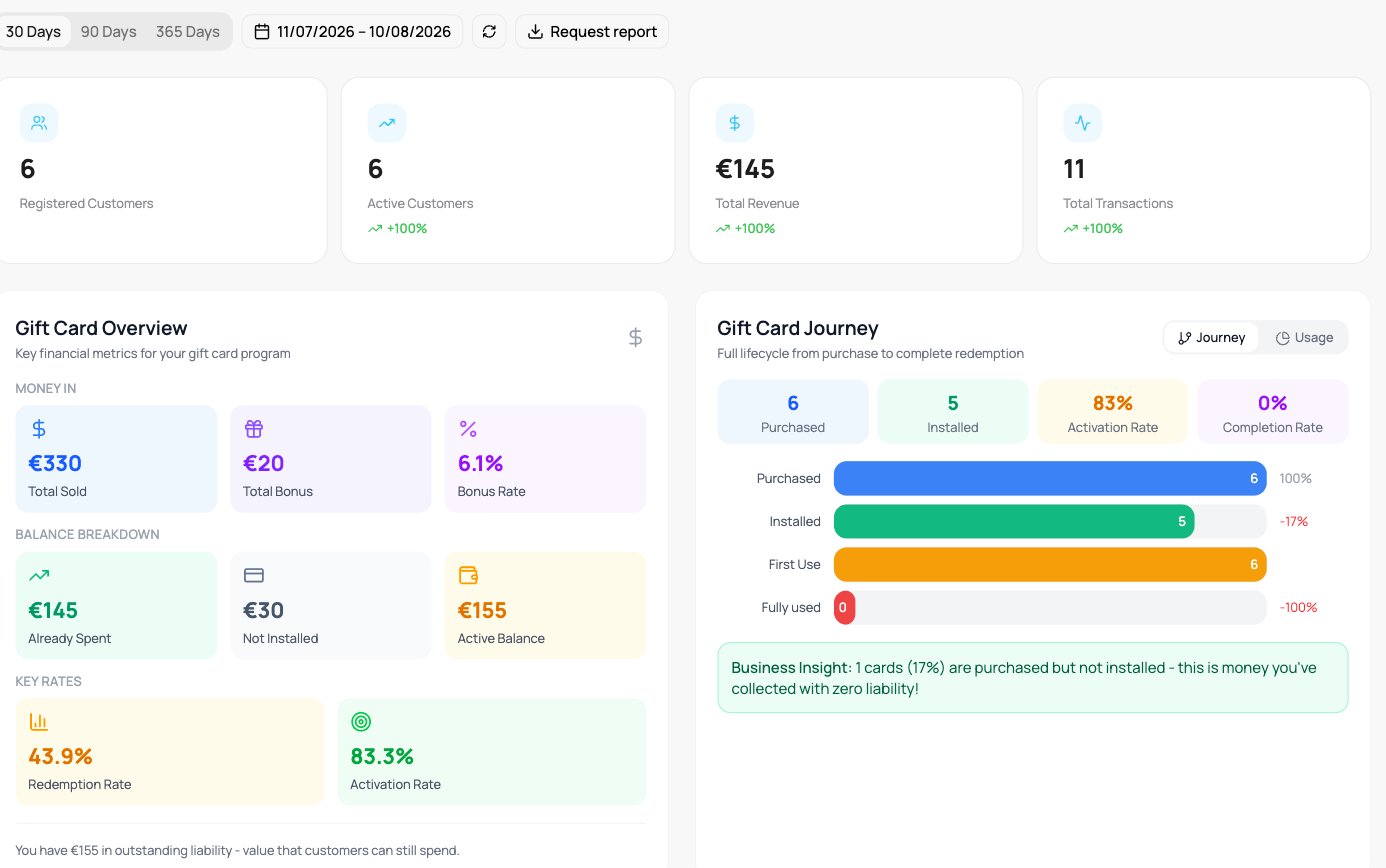
Gift card analytics
Gift Card Overview
On a gift card, the first headline tile is Paid by customers instead of Total Revenue. It is the money buyers paid for vouchers, minus refunds. The Gift Card Overview panel shows the key money figures in three rows:
Outstanding is everything customers can still spend, whether the card is in a wallet or not. Under it you see how much is in a wallet and how much is not yet in a wallet. Vouchers that expired are not in it. Expired is what expired unused, and it has its own figure in Business ROI.
Under the panel, a note repeats the Outstanding amount: “You have X in outstanding liability - value that customers can still spend.”
Outstanding is always today’s figure for the whole card. Whether and how you book it is a question for your accountant.
Online sales
When you sell gift cards online through Stripe Connect, the panel ends with a short Online sales breakdown for the period you picked:
It appears only when a VEXiON cards fee was charged in the period. Sales at the till or with the Scanner carry no fee, so they are not in it.
Stripe charges its own card fee separately, see Stripe pricing. The VEXiON cards fee stays on an online sale that was refunded or disputed. See Stripe Connect for your rate.
Gift Card Journey
The full lifecycle from purchase to complete redemption: Purchased, Installed, First Use, Fully Used, with the activation and completion rates. When some vouchers are not in a wallet yet, a Business Insight note tells you how many, and how much they still hold for your customers to spend. The recipient can spend that money as soon as they add the card to a wallet.Time Analytics
Timing of gift-card usage: Average Days to First Use and to Full Use, Average Card Lifespan, Redemptions Per Card, Average Days Between Uses, and Cards Used in Period.Expiration Tracking
Cards approaching expiry, grouped by 7, 30, 60, and 90 days and Expired, with the value at risk in each bucket. Expired is the value of vouchers that expired unused.Purchase Behavior
How gift cards are bought: Most Popular Amount, Repeat Purchasers, Gift vs Self Purchases, a purchase trend, amount distribution, unique purchasers, and SMS / Email delivery counts.Program Health Score, Balance Trends & Business ROI
- Program Health Score rates the program (Active, Dormant, At-Risk, and Churned cards). Next to the score, Cards in a wallet shows how many cards customers added to a wallet out of all cards sold, for example “3 of 5”.
- Balance Trends shows value Issued, Top-ups, and Redeemed over time, the utilisation rate, and average balance.
- Business ROI shows Expired, Bonus given, Avg. Spend Per Card, Redemption Rate, and Breakage Rate. At the bottom it repeats Voucher value issued, Redeemed, and Outstanding. Outstanding is the same figure as in the Gift Card Overview. It covers all time and is not filtered by period.