

Invoices
Your invoices are listed with their number, date, amount, and a paid / unpaid badge. Each one has a download button for the PDF.
The invoices list
Invoices are proper accounting documents, not just payment receipts, so they carry your company’s legal and tax details and are valid for your bookkeeping.
Billing email
The billing email is where invoices are sent. It is shown on the Billing tab, and you can edit it there if invoices should go to your accountant or a shared inbox rather than your login email. The billing email is separate from the owner: when you transfer ownership, invoices keep going to the old address until the new owner changes it here.Billing details (the legal entity on your invoices)
Your invoices show your legal entity details: legal (company) name, business registration number, tax ID, VAT number, and address. These are displayed on the Billing tab for reference. You edit them yourself on the Billing tab. Click Edit details, type your company registration number, and press Look up: we fill in the legal name, tax ID and address straight from the business register, and work out your VAT number for you if you are VAT-registered. Look up is available for companies in Slovakia and Czechia only. In other countries, fill in the details by hand. Save, and the new details apply to future invoices.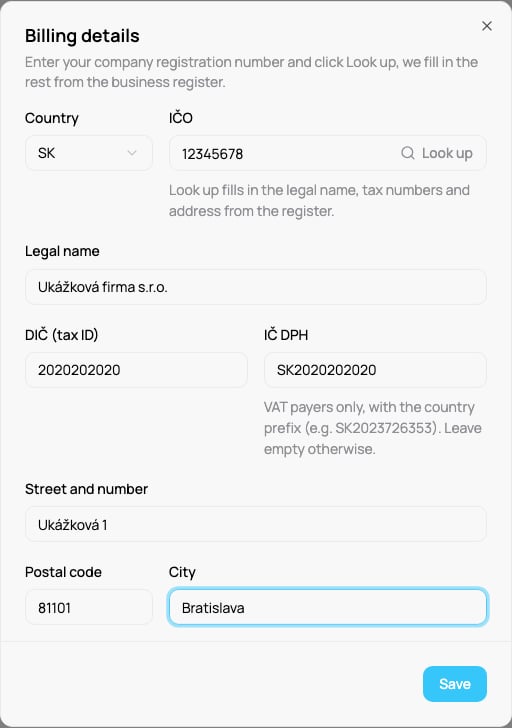
Editing your billing details
VAT for companies in another EU country
Enter your VAT ID at checkout. Under the Pay button, tick I’m providing a tax ID and type your VAT ID. A company with a valid VAT ID in another EU country pays no VAT (reverse charge) and sees the final amount before it pays. Without a VAT ID we charge Slovak VAT of 23 %.Accounts billed through Shopify see their charges on their Shopify invoice instead; there is no separate invoices list in VEXiON for them.